
Allocation key: generate, simulate, track
From the first proposal to the amendment: create, generate, test and update your community's key in one place.
The allocation key decides, quarter-hour by quarter-hour, who receives which share of local generation. Choosing it is only the beginning: the members have to accept it, it has to be tested on real data, then updated by amendment as members join and leave. In a spreadsheet, its coefficients live in files that get copied over and over until no one can say which version dates from when. OptimCE covers this whole life cycle. Our guides explain how to choose a key; this page shows where each step happens in the tool.
How OptimCE handles it
Create a key
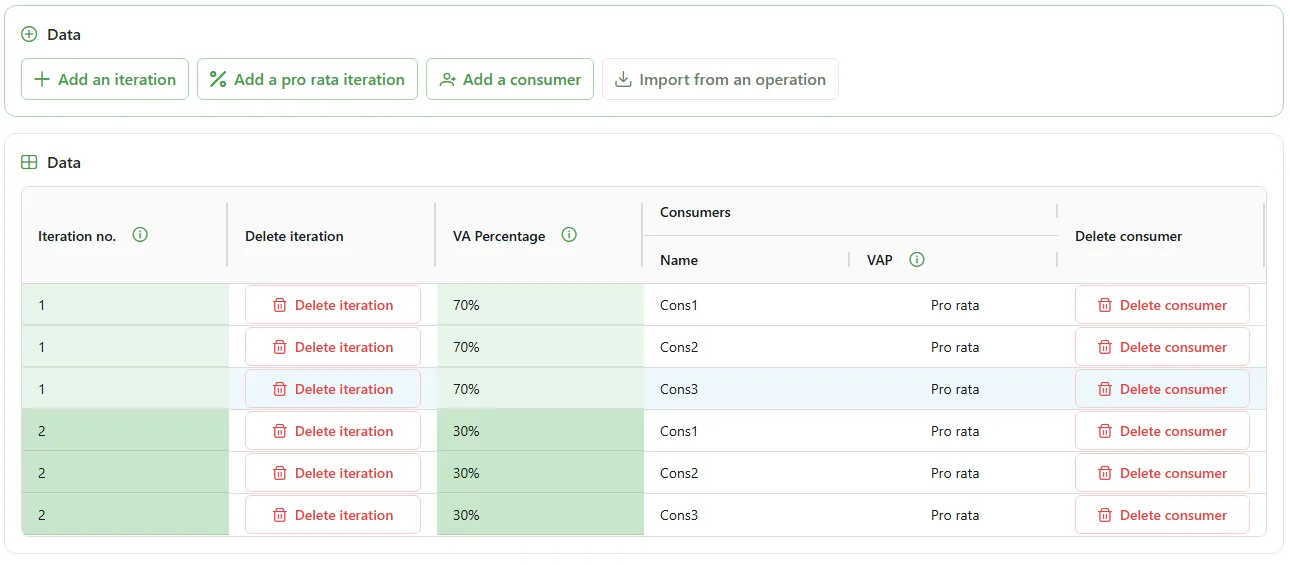
A key can be built in two ways: in a full grid, or with a step-by-step wizard. Both lead to the same key. The wizard asks for the number of consumers and their names, then for iterations: each one allocates a percentage of the available energy, for example pro rata to each member’s actual consumption, until 100% is reached. A review page shows the full grid before the key is saved.
Generate a candidate key
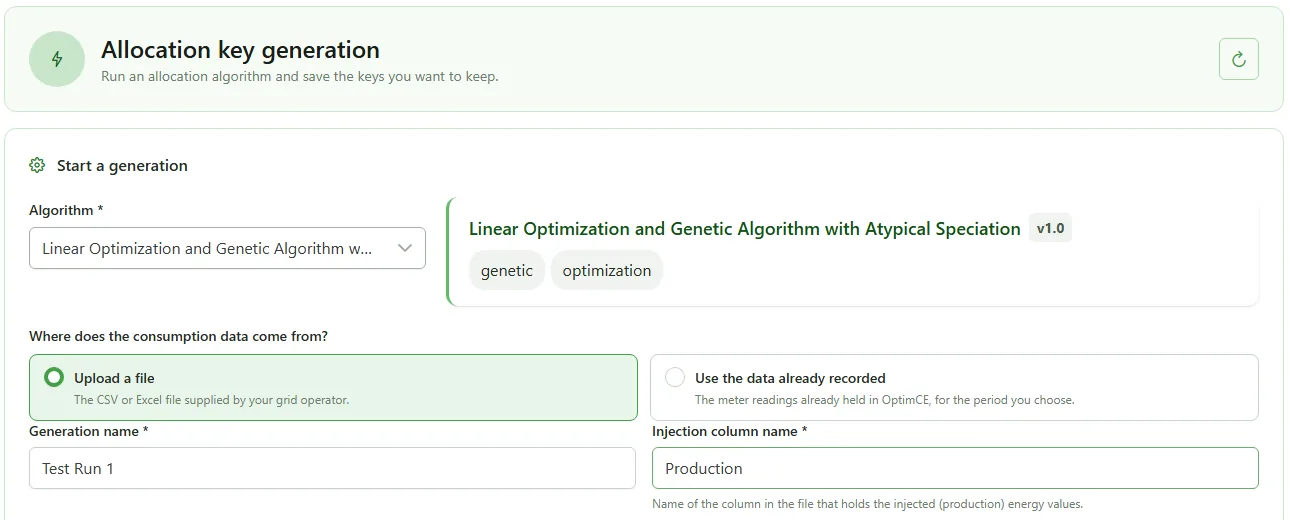
From a CSV file of quarter-hourly consumption and generation, the generation module proposes a candidate key, with the expected collective self-consumption rate. Two algorithms are available:
- an exhaustive search over the standard keys of your region;
- LOGAAS (shown as “OLAGSA” in the application), from the research of CeCoTePe in the Locomotrice project, which combines linear optimisation and a genetic algorithm.
The first stays within your region’s catalogue of standard keys. The second also searches outside that catalogue: it can find a better split, but the key it proposes then requires a specific procedure (see below).
The generation is queued, then the list of computed keys appears, each with the detail of its allocation by iteration. You save the one that suits you to your allocation keys. The generation module is enabled in the community’s annex services.
Simulate a key on your data
Simulation starts from a key of your choice and replays it on your own file, without touching the key in force. You read self-consumption, surplus, self-sufficiency rate and sharing rate, overall, per time step and per iteration. The per-consumer detail shows the allocation, consumption, self-consumed energy, surplus and residual volume: this is where you compare two allocations before proposing an amendment.
Track versions and acceptance
Every version of the key is recorded, and the members’ acceptance is tracked. When a member joins or leaves, the new version is added to the history instead of replacing the old one. A key proposed by the tool never goes to the grid operator on its own: it follows the usual amendment workflow, just like a key built by hand.
What it does not do
Nothing is sent to the grid operator. OptimCE prepares and keeps the key; its transmission follows the amendment procedure, which the community carries out itself.
No real time. Generation and simulation work on the files you import, not on live measurements.
Generation proposes; it does not decide. The choice of key remains with the community and its members. In Wallonia, a key outside the standard catalogue follows a specific procedure: the generation guide describes it in detail.
A simulation is only as good as its file. It replays the period and the profiles you give it. Its results say nothing about a year that is not in it.
Frequently asked questions
What is the difference between generating and simulating a key?
Generation starts from your data and proposes a candidate key, with the expected collective self-consumption rate. Simulation starts from a key you have chosen and measures what it would have achieved on your data. You generate to look for a key; you simulate to check the one you have in mind.
What data do you need to generate or simulate a key?
A CSV file of quarter-hourly consumption and generation, with one column per consumer and one column for the injected generation, whose name you specify. This is the time step of allocation in Belgium: 96 values per day and per meter.
Is the generated key sent to the grid operator?
No. OptimCE proposes a key; it never sends it to the grid operator on its own. A new key follows the usual amendment workflow; OptimCE keeps every version of it and tracks its acceptance by members.
What is LOGAAS?
LOGAAS is one of the two generation algorithms, from the research of CeCoTePe in the Locomotrice project. It combines linear optimisation and a genetic algorithm, and its advanced settings have default values that suit most uses. The application shows it under the name “OLAGSA”. The other algorithm searches through your region’s standard keys.
Further reading
- Automatic allocation key generation: the two algorithms in detail, and when to choose one or the other.
- Simulate an allocation key: test your scenarios: reading the indicators and comparing scenarios.
- Allocation key in Belgium: the 3 regions: the standard keys and the rules of each region.